Mastering n8n Content Filtering & Scoring for Automation Workflows ✨

We've all been there, right? Staring at a mountain of incoming data, desperately trying to find the gems amidst the noise. In our content automation journey, especially after setting up our RSS feed ingestion in Episode 3, we might find ourselves drowning in articles that aren't quite hitting the mark. This isn't just a time-sink; it's a performance drain on our downstream processes! We need a way to intelligently sift, sort, and prioritize. This is where robust n8n content filtering scoring automation comes into play. ✨
The Pain Point: Drowning in Digital Noise
Imagine your meticulously crafted RSS feed workflow (remember all that good stuff from Episode 3? 😉) bringing in hundreds of articles daily. Fantastic! But then you realize only a fraction are truly relevant to your specific goals. Maybe you're looking for articles on 'serverless architecture' but keep getting 'server maintenance tips'. Or perhaps you need 'React performance' but get 'React basics for beginners'. Processing all that irrelevant data is like trying to find a needle in a haystack, but you're paying for every single piece of hay to be analyzed. It's inefficient, costly, and frankly, a bit soul-crushing for us developers who love clean, purposeful data flows.
The Mental Model: Your Workflow's Personal Content Curator 🚀
Think of our n8n workflow as a sophisticated content pipeline. Data flows in, but before it reaches its final destination, it passes through a series of intelligent gates. First, a 'scorer' examines each piece of content, assigning it a relevance score based on keywords and criteria we define. Then, 'filters' act like bouncers, deciding who gets in and who gets sent to the 'archive' based on those scores. Finally, a 'router' directs the high-scoring content to the right next step. This ensures only the most valuable content proceeds, making your entire automation smarter and more efficient.
Let's visualize this flow:
This simple diagram illustrates how content moves through our scoring and filtering nodes, ensuring only the valuable bits continue their journey. It's about being proactive, not reactive! 💡
The Deep Dive & Code: Sculpting Your Content Flow
Let's roll up our sleeves and get into the nitty-gritty of building this intelligent content curator. We'll leverage n8n's powerful Function node for scoring and then use IF and Switch nodes for dynamic filtering and routing.
Step 1: Intelligent Scoring with the Function Node
Our Function node is where the magic of keyword matching and ranking happens. It's incredibly flexible, allowing us to write custom JavaScript to analyze incoming data items. For each item from our RSS feed, we'll examine its title and description, assign points for relevant keywords, and then attach a score property to the item.
Here’s how we can set up a Function node to score content based on keywords. We'll look for terms related to 'web development', 'performance', and 'React'.
for (const item of items) {
  let score = 0;
  const title = item.json.title ? item.json.title.toLowerCase() : '';
  const description = item.json.description ? item.json.description.toLowerCase() : '';

  // Define keywords and their weights
  const keywords = {
    'react': 5,
    'vue': 3,
    'angular': 2,
    'frontend': 4,
    'performance': 6,
    'optimization': 5,
    'webdev': 3,
    'javascript': 2,
    'typescript': 3,
    'serverless': 4
  };

  // Check title for keywords
  for (const keyword in keywords) {
    if (title.includes(keyword)) {
      score += keywords[keyword];
    }
  }

  // Check description for keywords (with a slightly lower weight perhaps, or just add directly)
  for (const keyword in keywords) {
    if (description.includes(keyword)) {
      score += keywords[keyword];
    }
  }

  // Add a bonus for highly specific phrases
  if (title.includes('react performance optimization')) {
    score += 10;
  }
  if (description.includes('vue 3 composition api')) {
    score += 8;
  }

  item.json.score = score;
}
return items;
Why this code is better:
- Centralized Keyword Management: Keywords and their weights are easily configurable at the top of the function. No digging through logic to update your focus! ✨
- Case-Insensitive Matching: By converting title and description to lowercase, we ensure our keyword matches are robust.
- Customizable Weights: You can fine-tune the importance of different keywords, giving more weight to highly relevant terms.
- Phrase Bonuses: The ability to add bonus points for specific phrases allows for incredibly granular control over relevance.
- Non-Destructive: We're adding a new
scoreproperty to each item, preserving the original data. This is crucial for flexibility downstream.
After this node runs, every item will have a
score property, ready for the next stage!
Step 2: Filtering with the IF Node
Now that our content items are scored, we can use an IF node to filter out the less relevant ones. This is your first line of defense against content overload. We'll set a threshold, say, a score of 10. Anything below that gets routed differently, or perhaps discarded.
Here's how you'd configure an IF node:
- Value 1:
{{ $json.score }} - Operation:
Is greater than or equal - Value 2:
10(or whatever threshold you deem appropriate)
True (for items meeting the score) and False (for items below the score). The True branch will lead to our next processing steps, while the False branch could lead to an archive, a log, or simply terminate.
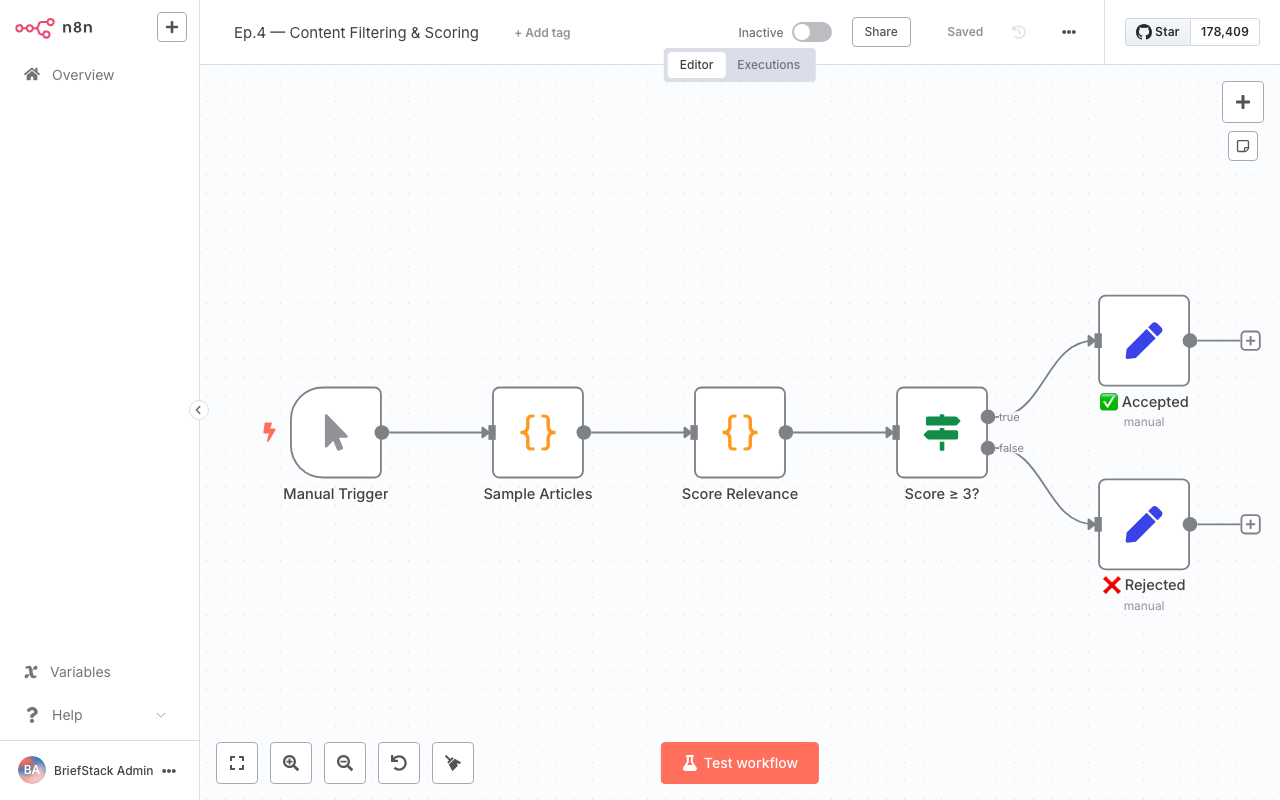
This screenshot shows a typical n8n workflow editor, where you can connect nodes like Function and IF to build your automation logic. Notice how easily you can visualize the data flow!
Why this approach is better:
- Clarity: The
IFnode provides a clear, visual branching point in your workflow, making it easy to understand which content goes where. - Efficiency: Irrelevant items are stopped early, preventing unnecessary processing by subsequent nodes.
- Dynamic Thresholds: The threshold can be easily adjusted in the UI, allowing you to quickly adapt to changing content needs.
Step 3: Advanced Routing with the Switch Node
Sometimes, a simple "yes/no" filter isn't enough. What if you want to categorize content into 'High Priority', 'Medium Priority', and 'Low Priority' based on their scores? That's where the Switch node shines! It's like a multi-lane highway exit, directing traffic based on different conditions.
Let's say we want to route content based on these score ranges:
- High Priority: Score >= 20
- Medium Priority: Score >= 10 and < 20
- Low Priority: Score < 10
Here’s how you'd configure a
Switch node:
- Mode:
Define Cases - Expression:
{{ $json.score }}
- Case 1 (High Priority):
Is greater than or equal,20 - Case 2 (Medium Priority):
Is greater than or equal,10 - Default Case: This will catch anything else (scores less than 10).
This dashboard view gives you a high-level overview of your n8n workflows, where you can see their status and execution history, helping you monitor your content filtering and scoring in action.
Why this approach is better:
- Granular Control: The
Switchnode allows for multiple distinct output branches, perfect for categorizing content into different processing paths. - Scalability: As your scoring logic evolves, you can easily add more cases without overhauling your entire workflow structure.
- Clean Workflow: Keeps your workflow visually organized, preventing a spaghetti mess of
IFnodes for complex routing.
Performance vs DX: A Beautiful Harmony 🤝
This approach to content filtering and scoring in n8n offers a fantastic balance between raw performance and developer experience.
From a Performance standpoint:
- Reduced Processing Load: By filtering out irrelevant content early, you significantly reduce the amount of data that needs to be processed by downstream nodes. This saves CPU cycles, memory, and potentially API calls, leading to a leaner, faster, and more cost-effective workflow.
- Targeted Actions: Your subsequent automation steps (like saving to a database, sending notifications, or even generating AI content, wink wink 😉) only act on highly relevant data, making them more impactful and efficient.
From a Developer Experience (DX) standpoint:
- Visual Clarity: n8n's visual workflow editor makes it incredibly easy to see how content is scored and routed. Debugging becomes a breeze because you can literally watch the data flow.
- Code in Context: The
Functionnode allows you to write custom JavaScript right where it's needed, keeping your scoring logic encapsulated and easy to manage. No more jumping between different files or services! - Rapid Iteration: Want to tweak a keyword weight or adjust a scoring threshold? It's a quick change in the
FunctionorIF/Switchnode settings, not a full-blown deployment. This means you can iterate on your content strategy much faster, letting you go home earlier with a smile! 🏡
The Wrap-up: Your Components Are Way Leaner Now! ✨
You've just transformed your n8n content automation from a general-purpose ingestion tool into a highly intelligent, purpose-driven content curator! By implementing robust scoring and filtering, you're ensuring that only the most valuable information makes it through your pipeline. This not only boosts performance but also makes your life as a developer so much smoother.
Next up in our series, things get even more exciting! We'll dive into Episode 5: AI Content Generation with n8n and Gemini. Imagine taking your perfectly filtered, high-scoring content and using it as a springboard for creating entirely new, unique content. Get ready to unleash some serious creative automation power! Happy Coding! 🚀
FAQ Section
How complex can my scoring logic be within an n8n Function node?
The Function node is essentially a JavaScript sandbox, so your scoring logic can be as complex as you need it to be. You can include multiple keyword lists, apply different weights, use regular expressions for pattern matching, or even pull in external data if needed (though that might require an HTTP Request node before the Function node). Just remember to keep it performant for large datasets!Can I use external data sources for my keyword lists instead of hardcoding them?
Absolutely! A common pattern is to use an HTTP Request node or a Google Sheets node (or similar) at the beginning of your workflow to fetch a dynamic list of keywords and their weights. You can then pass this data to your Function node, making your scoring logic incredibly flexible and easy to update without modifying the workflow itself.What's the main difference between using an IF node and a Switch node for filtering?
AnIF node is best for binary decisions (true/false, pass/fail) with two distinct output branches. A Switch node, on the other hand, is designed for multi-way branching, allowing you to define multiple cases based on an expression's value. Use IF for simple filtering and Switch for categorizing or routing data into several different paths.How can I handle multiple scoring criteria, like both keyword relevance and recency?
You can combine multiple criteria within your Function node. For example, in addition to keyword scoring, you could calculate a 'recency bonus' based on the item's publication date. Just ensure each criterion contributes to the finalscore property in a way that accurately reflects its importance. You can also use separate Function nodes for different scoring aspects and then combine their results.